


What Is The Role Of Inventory Management
Inventory management is the process of tracking what stock you have, where it sits, and when to order more. It covers receiving goods, storing them, picking orders, and shipping them out. When it works, your team knows the count on every SKU at any moment. When it breaks down, orders get missed, customers complain, and cash gets tied up in the wrong places.
Reviewed October 2026. This article is written for owners and operations managers at small-to-mid wholesale and distribution businesses running 5 to 100 staff.
Book a callInventory Management in Plain Terms
Inventory management is the daily work of knowing what you have, where it is, and when to restock it. Think of it as the scoreboard for your warehouse floor.
It starts when a truck pulls in. Someone records what arrived, checks it against the buy order, and puts it away in a known location. From that point, every pick, every shipment, and every return has to be logged so the count stays honest. Receiving, put-away, picking, and shipping are the four moves. Miss any one of them and the count drifts. A drifted count means your team is working from bad data, and bad data costs money.
Inventory management is not a software category. It is a set of daily functions that either run cleanly or create daily pain.
We build it for your operation, and the first look is free
If you would rather not compare products, describe how your operation already works and we build the system around it.
No build cost. You see it running on your own process first, and the monthly subscription starts only once it is live.
Book a callWhy Inventory Management Matters for Distributors and Warehouses
Without a clear inventory role, stock counts drift fast. A missed receive here, a shipment logged late there, and within a week your numbers no longer match the shelf. Orders get missed. Customers call. Your team spends time hunting for product instead of moving it.
The cost runs in two directions. Overstocking ties up cash in product that sits. Understocking means lost sales and the kind of service failure that sends a buyer to a competitor. For small-to-mid wholesale and distribution operations, both hurt more because there is less margin to absorb them.
When Spreadsheets and Paper Stop Working
Many operations patch this gap with Excel files, printed receiving sheets, and email threads. It works at low volume. It stops working when SKU counts grow or order frequency picks up.
GS1, the global standards body behind barcode systems, states that standardized barcodes are "the foundation of supply chain visibility," and that foundation only pays off when your inventory process is built to use it. A scan means nothing if the receiving log is still on paper.
The gap between what the system says and what the shelf holds is where distributor margin goes to die.
How Does Accurate Stock Tracking Actually Work?
Accurate stock tracking means knowing the exact count of every SKU on hand, right now, without calling someone to go look. That real-time number feeds every other part of the operation.
Manual tracking works at low volume. A whiteboard or a spreadsheet can hold 50 SKUs. Add 200 more, double the order frequency, and the same sheet becomes a source of errors rather than answers. Someone updates a cell late. Two people edit the same row. A shipment goes out before the pick is logged. Each gap is small. Together they make the count unreliable.
The comparison is easier when one option is built for you
Off-the-shelf means fitting your process to the software. We do it the other way round, and the first look costs nothing.
Book a callStock Accuracy as a Tax Requirement
Accurate stock data is not just an working convenience. The IRS needs it. IRS Publication 538 states: "To figure taxable income, you must value your inventory at the beginning and end of each tax year." A count you cannot trust is a tax problem as well as an operations problem.
Purchasing, fulfillment, and reporting all pull from the same stock number. Get that number wrong and the errors multiply downstream.
Stock accuracy is not a feature to add later. It is the input every other function depends on.
Controlling the Flow of Goods In and Out
Inventory management plays a direct role in both directions of stock movement. Inbound, that means recording every buy order receipt: what arrived, how much, and where it went. Outbound, it means logging every pick and every shipment before the truck leaves the dock.
This two-way flow is where most manual errors happen in small operations. A receiving team checks in a pallet and writes it on a clipboard. Someone re-enters that number into a spreadsheet later, sometimes hours later, sometimes the next morning. In that gap, picks go out against a count that has not been updated yet.

The Compliance Cost of an Inaccurate Count
The same problem runs in reverse. A shipment leaves. The pick sheet gets filed. The count does not drop until someone processes the paperwork. Meanwhile, another order gets placed for stock that is already gone.
The US Federal Trade Commission's Mail and Internet Order Rule needs sellers to ship when they said they would or give customers a chance to cancel. An inaccurate count makes that promise hard to keep.
Logging both directions in real time is the fix. Everything else is a workaround.
Reorder Points and Avoiding Stockouts
A reorder point is the stock level that triggers a new buy order. When on-hand quantity drops to that number, it is time to buy. Setting reorder points correctly is a core role of inventory management.
At low SKU counts, a sharp buyer can track this by feel. At 300 or 500 SKUs, that same buyer is guessing. Some items run out before anyone notices. Others get ordered twice because two people saw the low count independently.
Automated reorder alerts replace the need to scan every item by hand each morning. The system watches the count. When it hits the threshold, it flags the item. The buyer reviews and approves. That shift from checking to reviewing saves hours each week and catches the fast-moving items before they go to zero.
A reorder point only protects you if someone or something is watching it consistently.
Connecting Inventory Data to Your Accounting Software and Your Existing Tools
Most small distributors already run their financials in dedicated accounting software. They are not looking to replace it. They want the inventory side to stop being a manual mess, not to migrate their entire accounting setup.
Inventory management software can sit alongside your accounting software rather than replacing it. A well-built system captures stock movements, generates buy orders, and tracks fulfillment. It then syncs that data to your accounting software so the financial records stay current without double entry.
See it running on your own process first
No build cost. The subscription starts once it is live and doing the job, not before.
Book a call
How Custom Builds Fit Around What Already Works
Rather than forcing an operation into a pre-built workflow, a custom build maps to how the team already works. The receiving process stays familiar. The pick and ship steps stay the same. What changes is that the data flows automatically instead of being re-entered by hand.
For operations that also use Access databases or older reporting tools, a custom build can pull from those sources too. The goal is to fix the manual parts without touching what already works. Keeping your accounting software and adding a proper inventory layer is almost always faster and cheaper than replacing both.
How inventory software works alongside your accounting software is a practical question, and the answer is: it connects, it does not compete.
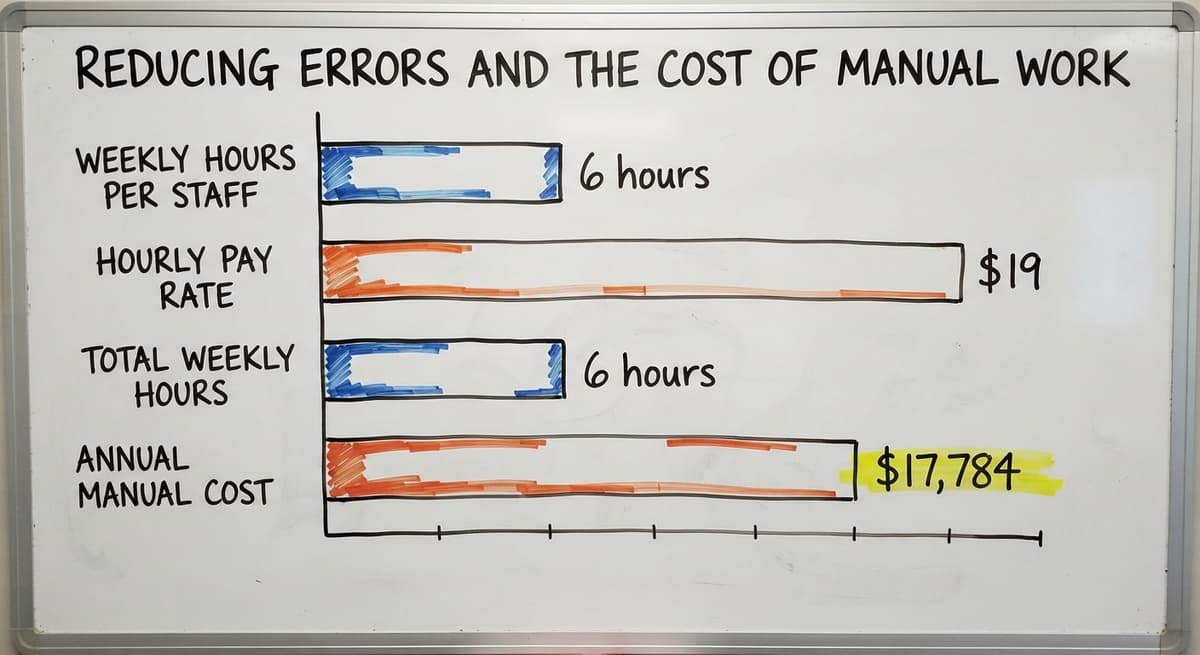
Reducing Errors and the Cost of Manual Work
Manual inventory work carries a hidden cost that rarely shows up on a single line in the budget. It is spread across staff hours, mis-picks, and duplicate data entry.
Consider a realistic example. Three warehouse staff each spend 6 hours a week reconciling spreadsheets and re-entering receiving data. The Bureau of Labor Statistics puts median pay for stock and order clerks at around $19 an hour. That is 3 people times 6 hours times $19, which comes to roughly $17,784 a year, before you count the cost of the errors those hours still produce.
What Mis-Picks Actually Cost a Small Team
Small teams feel mis-picks sharply. There is no buffer staff to catch a wrong item before it ships. A mis-pick means a return, a re-ship, and a customer who remembers the mistake longer than they remember the correct orders.
Automating replaces the repetitive steps, not the people doing them. The same staff can move faster, handle more volume, and spend their time on work that actually needs judgment.
The role of inventory management is to remove friction from daily operations, and friction always has a dollar figure attached to it.

Reporting and Visibility Across the Operation
Inventory management gives owners and operations managers a clear view of what is moving, what is sitting, and where stock is located at any point in time. That visibility is what turns raw counts into decisions.
Knowing which products turn fast tells a buyer where to keep safety stock deep. Knowing which products sit tells an operations manager where cash is parked unnecessarily. Knowing where stock is located inside the warehouse tells a pick team how to route quickly.
Not sure this is the right shape for your operation
Describe how the work runs today. We map it on a call and show you what it would look like built around that, before you spend anything.
Book a callWhy Stale Reports Lead to Bad Purchasing Decisions
Access databases and printed reports cannot give that picture in real time as volume grows. By the time a report is run and printed, the data is already hours old. A purchasing decision made on stale numbers is a guess dressed up as a plan.
The US Census Bureau's Monthly Wholesale Trade data tracks the inventories-to-sales ratio across wholesale firms nationally. Operations that carry too much relative to sales are a known margin risk. Real-time inventory visibility is what lets a manager spot that drift before it becomes a cash problem.
Visibility turns inventory data from a record of the past into a tool for running today.
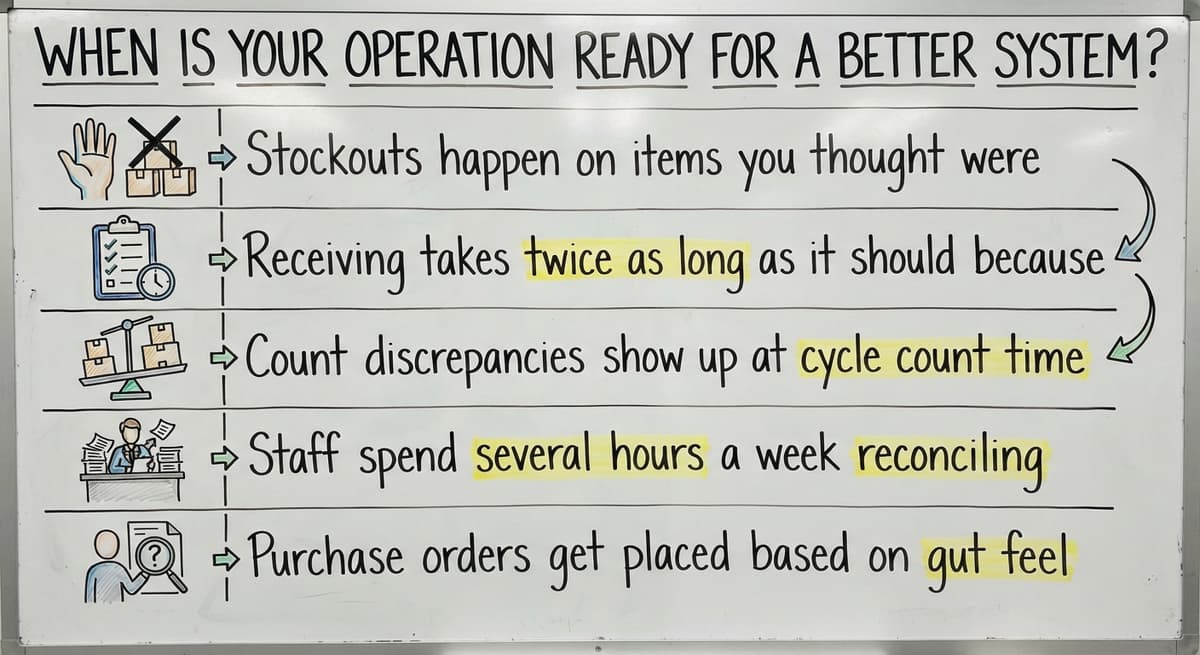
When Is Your Operation Ready for a Better System?
Your operation is ready for a better system when the manual workarounds are costing more than the fix would. The signs are specific and recognizable.
Look for these patterns in your current workflow:
- Stockouts happen on items you thought were well-stocked, because the count was wrong
- Receiving takes twice as long as it should because the paperwork has to be re-entered somewhere else
- Count discrepancies show up at cycle count time and no one can explain them
- Staff spend several hours a week reconciling spreadsheets instead of moving product
- Buy orders get placed based on gut feel rather than a reliable on-hand number
What a Custom-Built System Actually Looks Like
A custom-built inventory system is a practical next step for operations between 5 and 100 staff. Custom working software for fulfillment centers in this range does not need to be complex. It needs to match how the operation already runs, not demand that the team change their workflow to match the software.
The right system is built around your receiving process, your SKU structure, your reorder logic, and your existing tools. It removes the manual steps that cause errors and connects the data that is currently scattered across clipboards, inboxes, and spreadsheets.
If any of those patterns sound familiar, the practical next step is simple: describe how your operation currently works and see what a custom fit would look like. No obligation, no pitch deck, just a straight conversation about what is broken and what would fix it.
The best time to fix a manual inventory process is before the next busy season proves it cannot keep up.
Key Takeaways
The role of inventory management is not abstract. It is the daily work of keeping counts accurate, goods moving, and decisions grounded in real data. For a small-to-mid wholesale or distribution operation, that work either runs cleanly or creates constant friction.
- Accurate stock levels feed purchasing, fulfillment, and reporting
- Reorder points prevent stockouts without requiring someone to check every SKU by hand
- Connecting inventory data to your accounting software removes double entry without replacing your accounting setup
- Warehouse management for small and mid-size operations does not need an enterprise platform
- Replacing Excel and spreadsheets in a distribution business is a practical step, not a full migration
Custom inventory software for wholesale distributors is built to match your workflow, not the other way around. If the current process is creating daily pain, that is the signal to act.
Frequently asked questions
What is inventory management?
Inventory management is the process of tracking what stock you have, where it is located, and when to reorder it. It covers the full movement of goods: receiving inbound shipments, storing them in known locations, picking orders, and logging outbound shipments. The goal is a count that matches the shelf at any moment, so purchasing, fulfillment, and reporting all work from accurate data.
What is inventory management pdf?
A search for an inventory management PDF usually means someone wants a printable guide or reference document on the subject. The IRS publishes Publication 538, which covers inventory valuation rules for tax purposes and is available as a PDF at irs.gov. For working guidance, the NIST Manufacturing Extension Partnership publishes vendor-neutral supply chain resources at nist.gov/mep/supply-chain. Both are free, checkable, and written for real operations rather than software vendors.
What is the best way to manage inventory?
There is no single best way. The right approach depends on how many SKUs you carry, how fast they move, and how many people are managing the process. A spreadsheet works at low volume. A cloud inventory platform works for mid-size operations that need real-time counts and reorder alerts. A custom-built system works when the operation has specific workflows that off-the-shelf tools do not fit. The deciding factor is whether the tool matches how you actually work, not which tool has the most features.
What are the notes on inventory?
In accounting, inventory notes are the disclosures in a financial statement that explain how inventory is valued and counted. The IRS requires that inventory be valued at the beginning and end of each tax year to figure taxable income, as stated in IRS Publication 538. In an working context, inventory notes often refer to the records kept during receiving and cycle counts, such as quantity received, condition, and location. Both uses point to the same need: a reliable, documented count that can be checked and verified.
How does inventory management prevent stockouts and overstocking?
Inventory management prevents stockouts by setting reorder points: the stock level that triggers a new buy order before the shelf goes empty. It prevents overstocking by giving buyers accurate on-hand counts so they do not order product that is already sitting in the warehouse. Both problems come from the same root cause: a count that does not reflect reality. Accurate tracking fixes both at once.
How does inventory management connect to your accounting software without replacing it?
A well-built inventory system captures stock movements and syncs that data to your accounting software automatically. The inventory layer handles receiving, pick logging, and reorder tracking. Your accounting software handles the financials. Data flows between the two without manual re-entry. This approach keeps the accounting setup your team already knows and removes only the parts that are currently done by hand.
What are the signs that a small distributor needs a better inventory system?
The clearest signs are: stockouts on items you thought were well-stocked, receiving that needs paperwork to be re-entered somewhere else, count discrepancies that no one can explain at cycle count time, and staff spending several hours a week reconciling spreadsheets. If more than one of those is happening regularly, the manual process is costing more than a fix would.
Can a small operation with fewer than 100 staff benefit from inventory management software?
Yes. Operations in the 5 to 100 staff range often feel inventory errors more sharply than larger ones because there is no buffer to catch mistakes before they reach the customer. A system built to match the operation's actual workflow, rather than a generic platform, can remove the manual steps that cause errors without adding complexity the team does not need.
Start with a free first look
A 30 minute call, your operation mapped, and a clear picture of what we would build. No obligation and nothing to install.
Book a callRelated guides
The rest of this guide, for the parts of the job this page does not cover.
- What is the Difference Between Aggregate and Item Inventory Management
- What is Jit Inventory Management
- What is Kanban System of Inventory Management
- What is the Definition of Inventory Management
- What is an Important Factor in Inventory Management
- What is Abc Classification in Inventory Management
- What is Inventory Management in Working Capital
- What is Poor Inventory Management
- What is Inventory Management and Its Types
- What is the Main Purpose of Inventory Management
- What is Inventory Management in Pharmacy
- What is Effective Inventory Management
- What is Information Technology Inventory Management
- What is Risk Pooling in Inventory Management
- What is Inventory Management Mary Kay
- What is Stock Taking in Inventory Management
- What is Hospital Inventory Management
- What is Bin Number in Inventory Management
- What is the Scope of Inventory Management
- What is the Goal of Inventory Management Quizlet
- What is the Implication of Proper Inventory Management
- What is Omni-channel Inventory Management
- What is Inventory Management and Its Importance
- What is the Importance of Eoq in Inventory Management